

Branch view
Open any repository on entire.io to land on its branch list. Each branch shows recent commits grouped by day, with the checkpoints captured on each commit.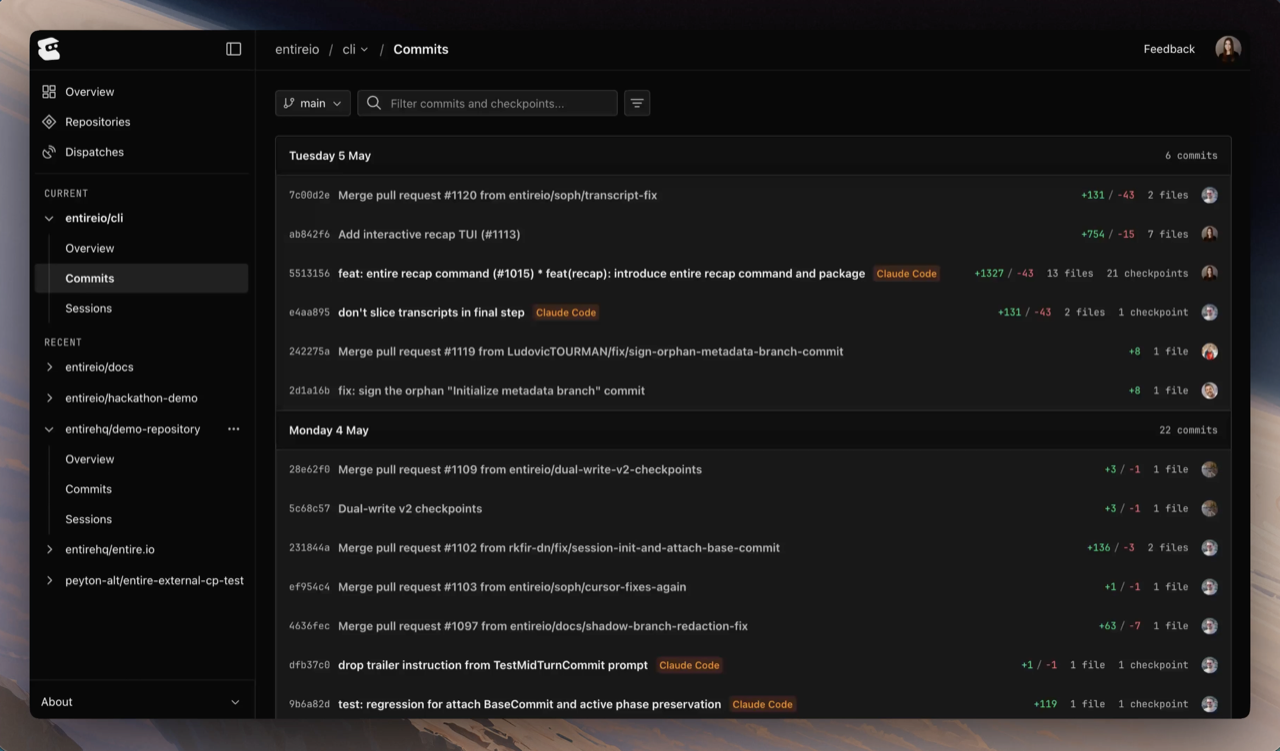
- Commit SHA — 7-character prefix
- Commit message — the title of the commit
- Agent — which AI coding agent (or agents) produced the checkpoints on this commit
- Code changes — additions, deletions, and file count
- Checkpoint count — how many checkpoints are attached (shown only when more than zero)
- Author — GitHub avatar of the commit author
Checkpoint detail
Click a checkpoint to open its detail view. The view has two main tabs:- Sessions — every session that contributed to this checkpoint (cross-link to Inspect a Session)
- Changes — files modified, with a tree on the left and a side-by-side or unified diff on the right
Linking from a commit or PR
A checkpoint is bound to a commit, so you can reach it from anywhere you can reach the commit.From a commit URL
Entire.io accepts commit SHAs directly:From a commit message
When the CLI captures a checkpoint, it appends anEntire-Checkpoint trailer to the commit message:
From the session view
Inside Inspect a Session, each session is linked to the checkpoints it produced. Use the checkpoint header’s actions menu to jump out to the underlying commit on GitHub.Rewind to a checkpoint
To restore your local repository to a checkpoint’s state, seeentire rewind.
Troubleshooting
For issues likeUnknown author on a checkpoint or missing checkpoints, see Troubleshooting.
Continue with
Inspect a Session
See the transcript, tool calls, and AI attribution behind a checkpoint.
Troubleshooting
Fix
Unknown author and sync issues.