> ## Documentation Index
> Fetch the complete documentation index at: https://docs.entire.io/llms.txt
> Use this file to discover all available pages before exploring further.
# Review a Checkpoint
> Browse checkpoints by branch, inspect details, and link from commits or PRs
A **checkpoint** is a snapshot of a coding session attached to a Git commit. Entire.io lets you browse checkpoints by branch, inspect what changed, and trace a commit or PR back to the agent session that produced it.
## Branch view
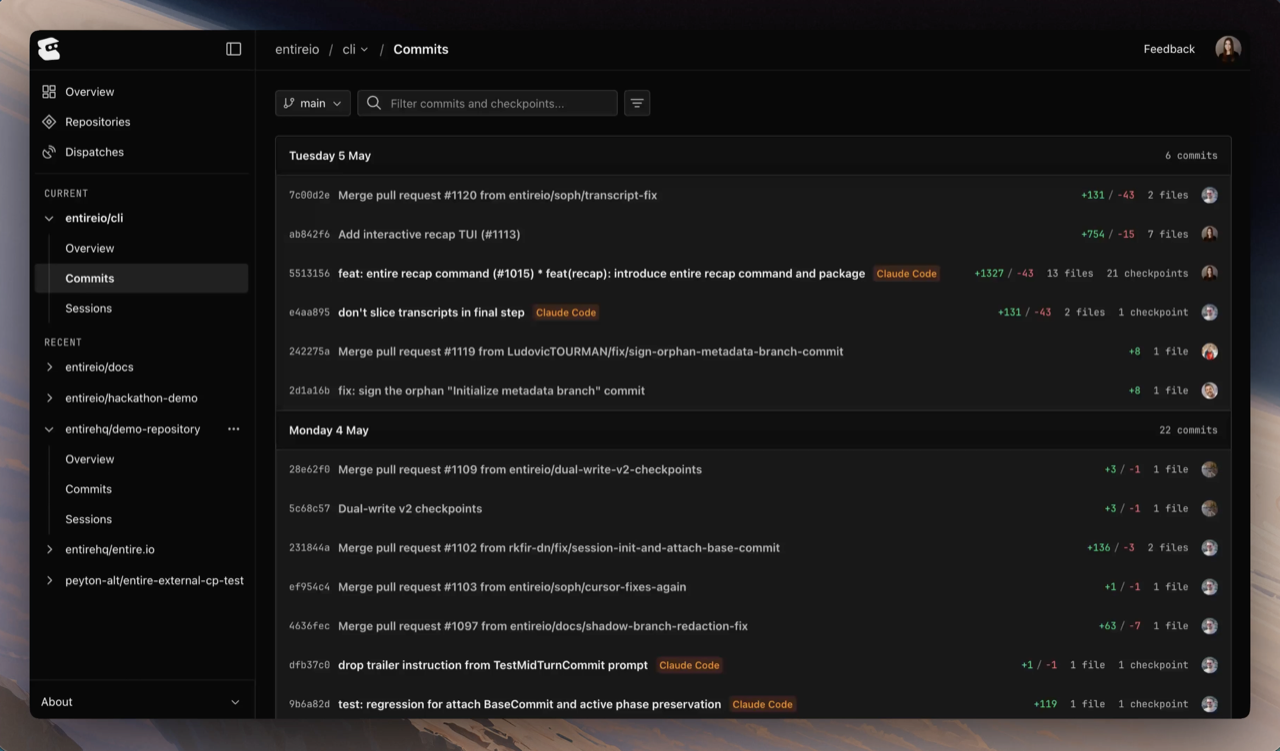
Open any repository on entire.io to land on its branch list. Each branch shows recent commits grouped by day, with the checkpoints captured on each commit.
Each row shows:
* **Commit SHA** — 7-character prefix
* **Commit message** — the title of the commit
* **Agent** — which AI coding agent (or agents) produced the checkpoints on this commit
* **Code changes** — additions, deletions, and file count
* **Checkpoint count** — how many checkpoints are attached (shown only when more than zero)
* **Author** — GitHub avatar of the commit author
## Checkpoint detail
Click a checkpoint to open its detail view. The view has two main tabs:
* **Sessions** — every session that contributed to this checkpoint (cross-link to [Inspect a Session](/web/inspect-session))
* **Changes** — files modified, with a tree on the left and a side-by-side or unified diff on the right
The header above the tabs shows the commit SHA, branch, author, agent, file count, AI percentage, and token usage for the checkpoint.
Use **Alt + ←** and **Alt + →** to step through the previous and next checkpoint on the same branch without leaving the detail view.
## Linking from a commit or PR
A checkpoint is bound to a commit, so you can reach it from anywhere you can reach the commit.
### From a commit URL
Entire.io accepts commit SHAs directly:
```
https://entire.io/gh///commit/
```
This resolves the SHA to its checkpoint and renders the same detail view.
### From a commit message
When the CLI captures a checkpoint, it appends an `Entire-Checkpoint` trailer to the commit message:
```
fix: handle empty repos in dispatch generation
Entire-Checkpoint: a1b2c3d4e5f6
```
### From the session view
Inside [Inspect a Session](/web/inspect-session), each session is linked to the checkpoints it produced. Use the checkpoint header's actions menu to jump out to the underlying commit on GitHub.
## Rewind to a checkpoint
To restore your local repository to a checkpoint's state, see [`entire rewind`](/cli/commands#rewind).
## Troubleshooting
For issues like `Unknown author` on a checkpoint or missing checkpoints, see [Troubleshooting](/web/troubleshooting).
## Continue with
See the transcript, tool calls, and AI attribution behind a checkpoint.
Fix `Unknown author` and sync issues.
 Each row shows:
* **Commit SHA** — 7-character prefix
* **Commit message** — the title of the commit
* **Agent** — which AI coding agent (or agents) produced the checkpoints on this commit
* **Code changes** — additions, deletions, and file count
* **Checkpoint count** — how many checkpoints are attached (shown only when more than zero)
* **Author** — GitHub avatar of the commit author
## Checkpoint detail
Click a checkpoint to open its detail view. The view has two main tabs:
* **Sessions** — every session that contributed to this checkpoint (cross-link to [Inspect a Session](/web/inspect-session))
* **Changes** — files modified, with a tree on the left and a side-by-side or unified diff on the right
The header above the tabs shows the commit SHA, branch, author, agent, file count, AI percentage, and token usage for the checkpoint.
Each row shows:
* **Commit SHA** — 7-character prefix
* **Commit message** — the title of the commit
* **Agent** — which AI coding agent (or agents) produced the checkpoints on this commit
* **Code changes** — additions, deletions, and file count
* **Checkpoint count** — how many checkpoints are attached (shown only when more than zero)
* **Author** — GitHub avatar of the commit author
## Checkpoint detail
Click a checkpoint to open its detail view. The view has two main tabs:
* **Sessions** — every session that contributed to this checkpoint (cross-link to [Inspect a Session](/web/inspect-session))
* **Changes** — files modified, with a tree on the left and a side-by-side or unified diff on the right
The header above the tabs shows the commit SHA, branch, author, agent, file count, AI percentage, and token usage for the checkpoint.