> ## Documentation Index
> Fetch the complete documentation index at: https://docs.entire.io/llms.txt
> Use this file to discover all available pages before exploring further.
# Dashboard
> See your activity across all connected repositories at a glance
The dashboard is where you land after signing in. It shows your activity across every connected repository: aggregate stats, a contributions graph, recent commits, and a list of repos you can drill into.
## Personal overview
The personal overview at `/overview` is the primary landing surface.
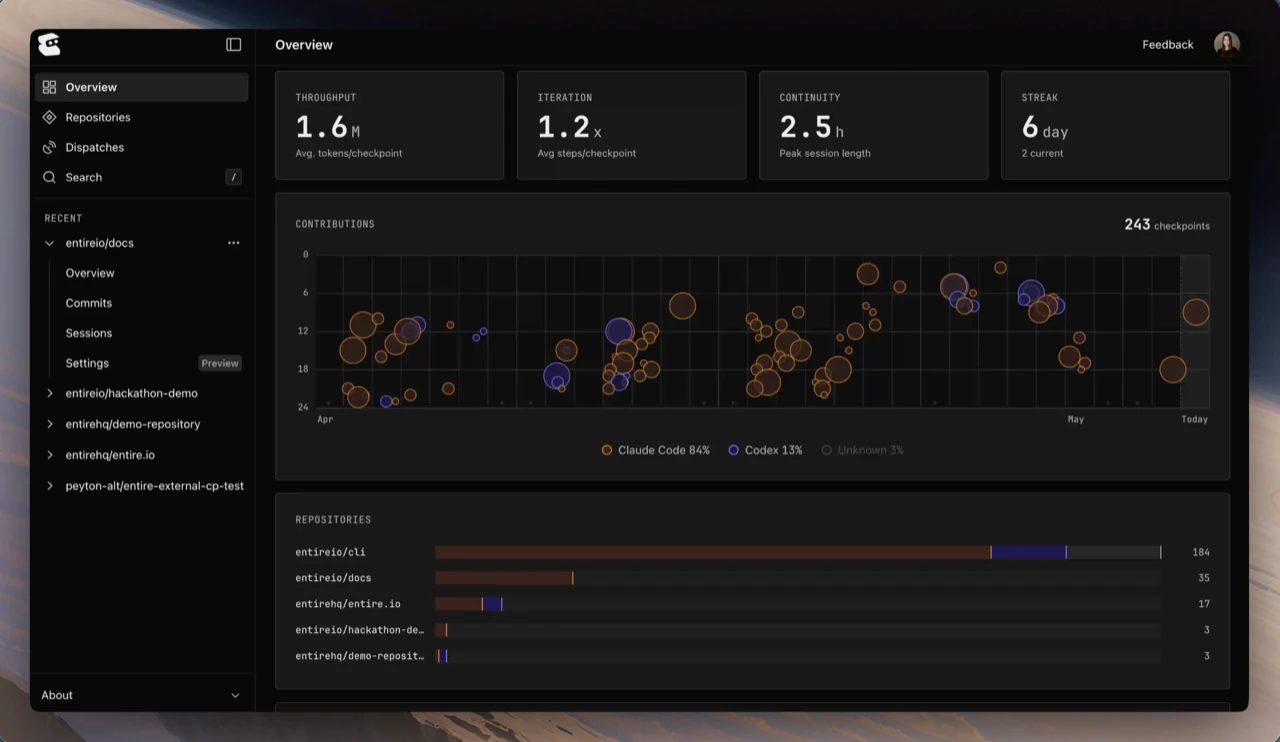 It includes:
* **Stats grid** — throughput, iteration, continuity, and streak across all your sessions
* **Contributions chart** — recent checkpoints over time, with agent attribution (Claude Code, Codex, and others)
* **Repositories breakdown** — activity per connected repository, with a bar showing relative checkpoint volume
* **Recent commits** — your most recent commits across all connected repositories
Open **Repositories** in the sidebar to see the full list of every connected repository. Click any repository to drill into its checkpoints by branch.
## Where to click first
If you're new to entire.io:
1. Glance at your **stats grid** to see how much activity has been captured
2. Open the **most recently updated** repository in the list
3. Click any checkpoint to start a [Review a Checkpoint](/web/review-checkpoint) flow
## Continue with
Open a checkpoint and see what changed.
Read the transcript and tool calls behind a checkpoint.
It includes:
* **Stats grid** — throughput, iteration, continuity, and streak across all your sessions
* **Contributions chart** — recent checkpoints over time, with agent attribution (Claude Code, Codex, and others)
* **Repositories breakdown** — activity per connected repository, with a bar showing relative checkpoint volume
* **Recent commits** — your most recent commits across all connected repositories
Open **Repositories** in the sidebar to see the full list of every connected repository. Click any repository to drill into its checkpoints by branch.
## Where to click first
If you're new to entire.io:
1. Glance at your **stats grid** to see how much activity has been captured
2. Open the **most recently updated** repository in the list
3. Click any checkpoint to start a [Review a Checkpoint](/web/review-checkpoint) flow
## Continue with
Open a checkpoint and see what changed.
Read the transcript and tool calls behind a checkpoint.