> ## Documentation Index
> Fetch the complete documentation index at: https://docs.entire.io/llms.txt
> Use this file to discover all available pages before exploring further.
# Review Checkpoints in Entire.io
> Review checkpoint details, sessions, and file diffs in Entire.io.
Use Entire.io when you want to browse checkpoints visually, inspect sessions, review diffs, or share checkpoint context with a team.
Open [entire.io](https://entire.io), then open the repository that contains the checkpoint.
## Review a checkpoint
1. Choose the branch you want to review.
2. Find the commit with the checkpoint.
3. Open the checkpoint detail view.
4. Use **Sessions** to inspect the prompt, transcript, tool activity, and session metadata.
5. Use **Changes** to review the files and diff connected to the checkpoint.
## Branch view
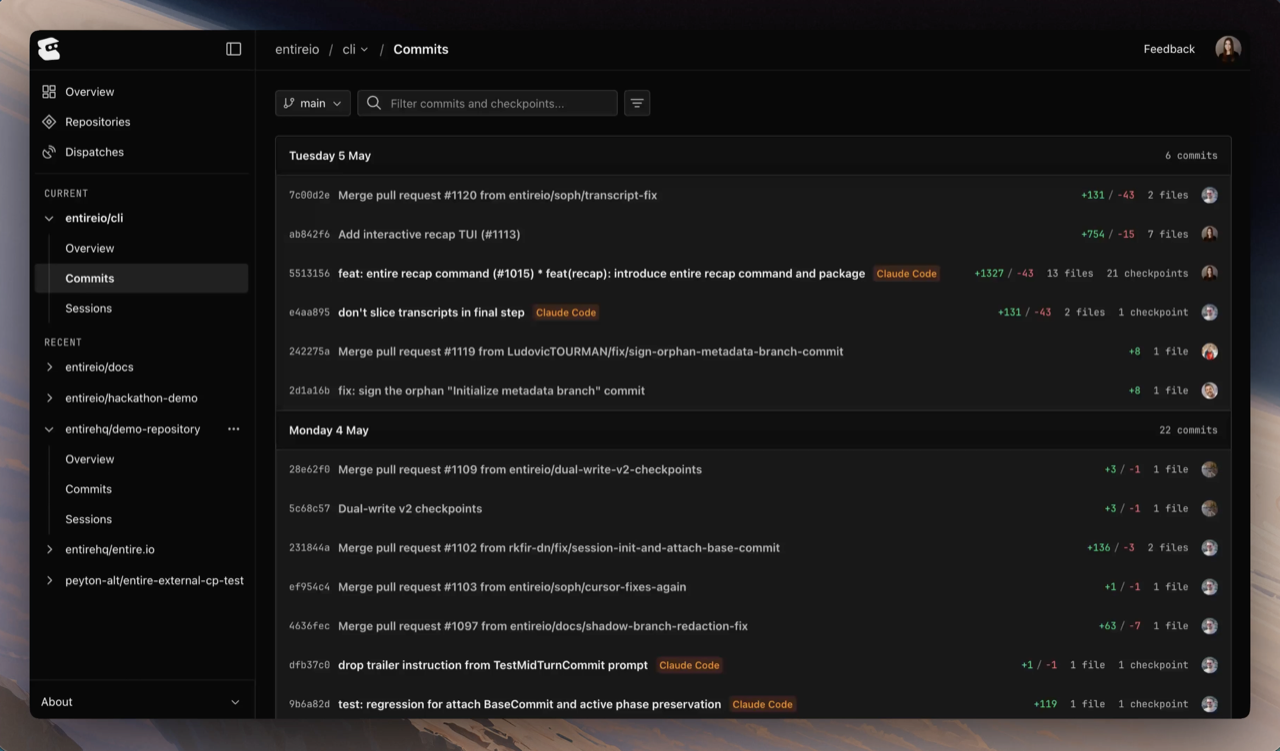
Open a repository to see its branch list. Each branch shows recent commits grouped by day, with checkpoints captured on each commit.
Each checkpoint row shows:
* commit SHA
* commit message
* agent
* code changes
* checkpoint count, when more than one checkpoint is attached
* author
## Checkpoint detail
Open a checkpoint to inspect the detail view.
The header shows the commit SHA, branch, author, agent, file count, AI percentage, and token usage when available.
The detail view has two main tabs:
* **Sessions**: prompts, transcript, tool activity, session metadata, and any sessions that contributed to the checkpoint
* **Changes**: modified files, with a file tree and diff view
Use **Alt + Left Arrow** and **Alt + Right Arrow** to move to the previous or next checkpoint on the same branch.
## Open from a commit
You can open a checkpoint from a commit URL:
```text theme={null}
https://entire.io/gh///commit/
```
When a commit has an `Entire-Checkpoint` trailer, the checkpoint ID also appears in the commit message:
```text theme={null}
fix: handle empty repos in dispatch generation
Entire-Checkpoint: a1b2c3d4e5f6
```
You can also open a checkpoint from a session when that session produced or contributed to the checkpoint.
## Continue with
Use checkpoint commands to list, explain, summarize, and inspect locally.
See the transcript and tool calls behind a checkpoint.
 The header shows the commit SHA, branch, author, agent, file count, AI percentage, and token usage when available.
The detail view has two main tabs:
* **Sessions**: prompts, transcript, tool activity, session metadata, and any sessions that contributed to the checkpoint
* **Changes**: modified files, with a file tree and diff view
Use **Alt + Left Arrow** and **Alt + Right Arrow** to move to the previous or next checkpoint on the same branch.
## Open from a commit
You can open a checkpoint from a commit URL:
```text theme={null}
https://entire.io/gh/
The header shows the commit SHA, branch, author, agent, file count, AI percentage, and token usage when available.
The detail view has two main tabs:
* **Sessions**: prompts, transcript, tool activity, session metadata, and any sessions that contributed to the checkpoint
* **Changes**: modified files, with a file tree and diff view
Use **Alt + Left Arrow** and **Alt + Right Arrow** to move to the previous or next checkpoint on the same branch.
## Open from a commit
You can open a checkpoint from a commit URL:
```text theme={null}
https://entire.io/gh/